Docker
- Docker Architecture
- QnA
- Dockerfile
- Docker Registry
- Docker Containers
- Docker Networking
- Docker Volumes
- Docker Compose
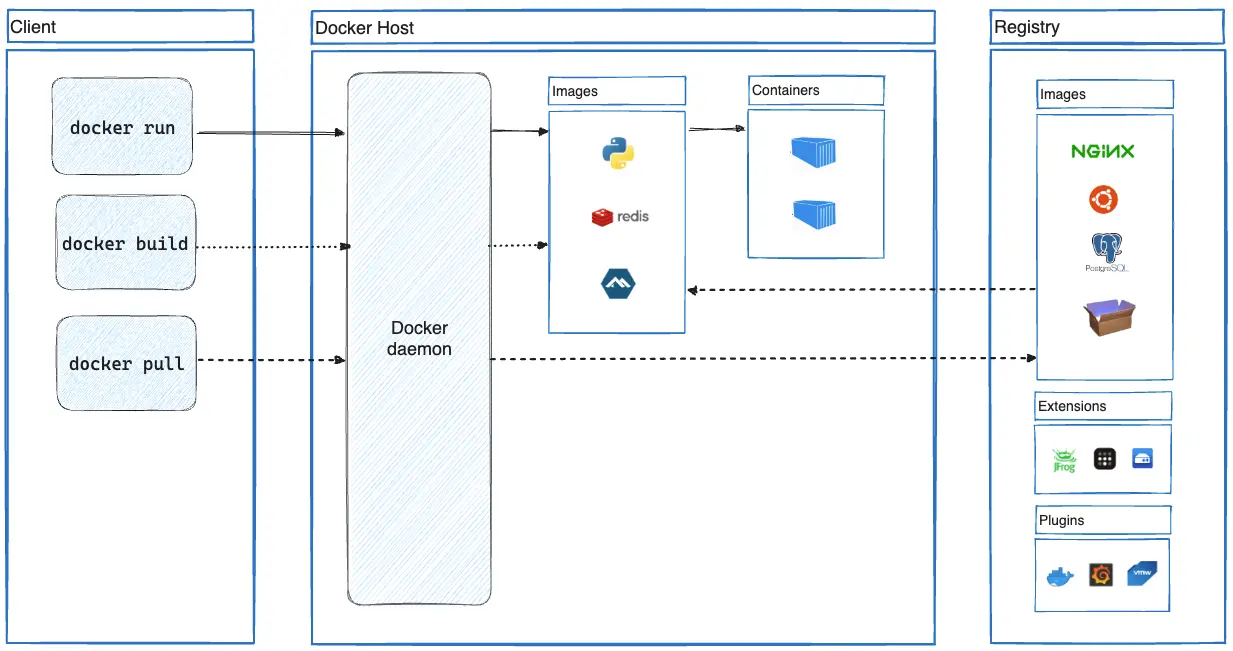
Docker Architecture
QnA
Q: Dockerfile에서 FROM scratch가 의미하는 바는?
- 이는 어떠한 파일 시스템도 포함하지 않은 완전히 비어 있는 이미지를 의미한다.
- 대부분의 OS 이미지의 Dockerfile은
FROM scratch로 작성된다.
Dockerfile
Dockerfile은 도커 이미지를 빌드하는 데 사용되는 스크립트다.
# Specifies the base image used to build the new image.
FROM image_name:tag

# Executes a command in the new image's filesystem during the build process.
RUN command

# Specifies the default command to run when a container is launched from the image.
CMD command

# Sets the working directory for subsequent instructions.
WORKDIR /path/to/directory

# Copies files or directories from the host system into the image.
COPY source destination

# Similar to COPY, but can also extract tarballs or fetch URLs.
ADD source destination

# Informs Docker that the container listens on specific network ports at runtime.
EXPOSE port

# Sets environment variables in the image.
ENV key=value

# Configures the container to run as an executable.
ENTRYPOINT command

# Defines a variable that users can pass at build-time to the builder with the docker build command.
ARG variable_name

# Sets the user the application will run as within the container.
USER username
Docker Registry
# Logs in to a Docker registry interactively.
docker login

# Logs out from a Docker registry.
docker logout

# Builds a Docker image from a Dockerfile in the current directory.
docker build -t image_name .

# Pushes a Docker image to a Docker registry.
docker push image_name

# List images
docker image ls

# Remove one or more images
docker image rm image_name
Docker Containers
# Shows containers in all states.
docker ps -a

# Starts a new container interactively using the specified image.
docker run -it image_name

# Starts a new container in detached mode (background).
docker run -d image_name

# Starts a new container with a specific name.
docker run --name custom_name image_name

# Sets environment variables in the container.
docker run -e "VAR=value" image_name

# Maps a container port to a host port.
docker run -p host_port:container_port image_name

# Mounts a host directory into the container.
docker run -v /host/path:/container/path image_name

# Stops a running container.
docker stop container_id

# Starts a stopped container.
docker start container_id

# Pauses the execution of a container.
docker pause container_id

# Resumes a paused container.
docker unpause container_id

# Restarts a running or stopped container.
docker restart container_id

# Attaches to a running container and opens a shell.
docker exec -it container_id /bin/bash

# Deletes a stopped container.
docker rm container_id

# Deletes all stopped container.
docker container prune

# Forces removal of a running container.
docker rm -f container_id

# Displays live resource usage statistics of a container.
docker stats container_id

# Displays logs from a container.
docker logs container_id

# Copies files between a container and the local filesystem.
docker cp /local/path container_id:/container/path

# Shows detailed information about a container.
docker inspect container_id

# Creates a new container without starting it.
docker create image_name
Docker Networking
# Lists all networks created on the Docker host.
docker network ls

# Creates a user-defined bridge network named 'my_network'.
docker network create my_network

# Displays detailed information about the 'my_network' network.
docker network inspect my_network

# Removes the 'my_network' network.
docker network rm my_network

# Connects a container to the 'my_network' network.
docker network connect my_network container_name

# Disconnects a container from the 'my_network' network.
docker network disconnect my_network container_name

# Attaches the container to an additional network 'my_network_2'.
docker network connect my_network_2 container_name

# Creates a multi-host overlay network 'my_overlay_network'.
docker network create --driver overlay my_overlay_network

# Removes all networks not used by at least one container.
docker network prune

# Creates a custom bridge network 'my_custom_network' with specified subnet and gateway.
docker network create --driver bridge --subnet=192.168.5.0/24 --gateway=192.168.5.1 my_custom_network

# Creates a secure bridge network 'my_secure_network' disabling inter-container communication.
docker network create --driver bridge --subnet=192.168.5.0/24 --gateway=192.168.5.1 --opt "com.docker.network.bridge.enable_icc=false" my_secure_network
Docker Volumes
# Lists all volumes on the Docker host.
docker volume ls

# Creates a named volume named 'my_volume'.
docker volume create my_volume

# Displays detailed information about the 'my_volume' volume.
docker volume inspect my_volume

# Removes the 'my_volume' volume.
docker volume rm my_volume

# Removes all volumes not used by at least one container.
docker volume prune

# Mounts the 'my_volume' volume to a specific path inside the container.
docker run -v my_volume:/path/in/container image_name

# Mounts a directory from the host system into the container.
docker run -v /host/path:/container/path image_name

# Creates a volume using a specific volume driver 'my_driver'.
docker volume create --driver my_driver my_volume

# Copies files from a container volume to a directory on the local host.
docker cp container_id:/path/in/container /local/host/path

# Mounts the 'my_volume' volume as read-only inside the container.
docker run -v my_volume:/path/in/container:ro image_name

# Mounts the 'my_volume' volume with specific options (e.g., read-write permissions).
docker run -v my_volume:/path/in/container:options image_name

# Creates a tar archive of the 'my_volume' volume in the /backup directory.
docker run --rm -v my_volume:/data -v /backup:/backup ubuntu tar cvf /backup/my_volume_backup.tar /data
Docker Compose
# Builds, (re)creates, starts, and attaches to containers for a service.
docker compose up

# Stops and removes containers, networks, volumes, and images created by 'up' command.
docker compose down

# Builds or rebuilds services defined in the docker-compose.yml file.
docker compose build

# Start services defined in the docker-compose.yml file.
docker compose start

# Stops services defined in the docker-compose.yml file without removing containers.
docker compose stop

# Restarts services defined in the docker-compose.yml file.
docker compose restart

# Pauses all services in the docker-compose.yml file.
docker compose pause

# Unpauses all paused services in the docker-compose.yml file.
docker compose unpause

# Displays log output from services.
docker compose logs

# Scale services to a specified number of instances.
docker compose scale service_name=num_of_instances